
Golfshot Golf GPS RangeFinder
Golf Genius MobileSports
4.41.21K Reviews
- Version
- 2.11.19
- Installs
- 1.00M
- Age Rating
- Everyone
Screenshots
Our Review of Golfshot Golf GPS RangeFinder
 Analysis by Appyee
Golf apps are easy to admire during the first round and easier to forget once the novelty wears off. I judge them by a more practical question: do they become a useful part of how I play, without turning every hole into a phone session? Golfshot Golf GPS RangeFinder is aimed at golfers who want course distances and a record of their rounds in one place. Its appeal is strongest when I use that information to make a decision, then put the phone away and get back to the game.
Getting Started and Building a Routine
First things first, downloading and setting up Golfshot Golf GPS RangeFinder is a breeze. Available for both Android and iOS, you just head over to your respective app store, hit download, and you’re off to the races. The app does require an account setup, but it’s straightforward. And trust me, it’s worth it for the personalized experience you get.
What the First Few Rounds Reveal
In its first week, the most immediately useful role for a golf GPS app is answering a specific question: what sort of shot am I facing from here? The store summary points to GPS yardages, shot tracking, scoring, and statistics, a combination that can help me move from guessing to making a more deliberate plan. The value isn’t that a distance reading chooses a club for me; it gives me a reference point so I can combine my own judgment with what I know about my game.
A realistic use is a casual weekend round with friends. I can check a yardage before choosing a club, record the score as play progresses, and review the round later rather than relying on a hazy memory of which holes went well. That makes the app useful even if I am not chasing a handicap breakthrough. It gives a social round a small amount of structure without requiring me to treat it like a formal training session.
The app is a sports product from Golf Genius Mobile. It is free to install, rated for Everyone, and has a 4.5 average from around 16,000 ratings. More than a million installs suggest it has found an audience beyond a tiny group of golf-tech enthusiasts. I would treat that popularity as reassurance that it is an established option, not proof that its workflow will suit every golfer.
Features You’ll Love
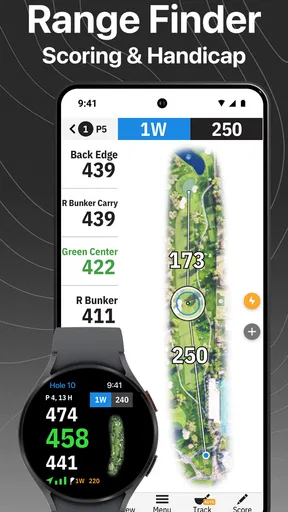
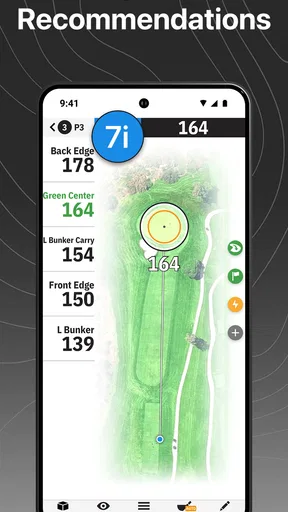
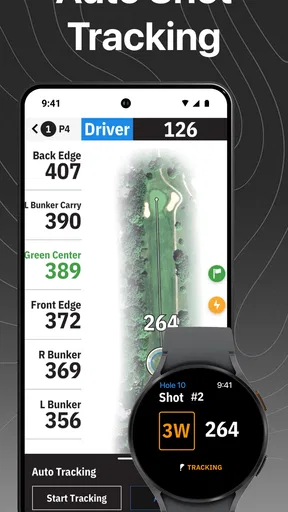
One of the coolest features is the real-time GPS tracking. This isn’t just any GPS; it’s like the holy grail of course management. With over 45,000 courses worldwide, you'll have all the information you need at your fingertips. Ready to improve those swings? The GPS shows you distances to the center of the green, hazards, and targets, helping you make better decisions on the course.
For the feature to earn its place in my routine, I need to use it quickly rather than stand over the ball scrolling through options. A helpful habit is to check the relevant distance while walking toward the ball, then make the club decision when I arrive. That small change keeps the phone from becoming the focus of the shot. GPS readings are also a guide, not a promise: my lie, wind, elevation, and comfort with a club still matter, so I would not treat a number on the screen as an instruction.
Another standout feature is the augmented reality view. I mean, who doesn’t want to feel like they’re in a high-tech golf simulator? Using your phone’s camera, you can see the course layout, distances, and even your target line in real-time. It’s like having X-ray vision for golf!
I see that view as an occasional aid rather than something I would need on every shot. It may be most helpful when I am unfamiliar with a hole and want a visual sense of the target, while a quick yardage check is probably the better choice when I already know the layout or want to keep play moving. Camera-based views also ask me to take out and aim my phone, which can feel like unnecessary fuss if I am already confident about the shot.
Tracking Your Game
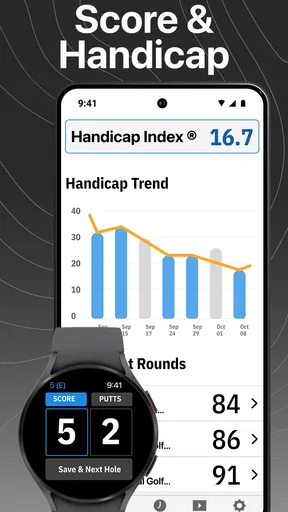
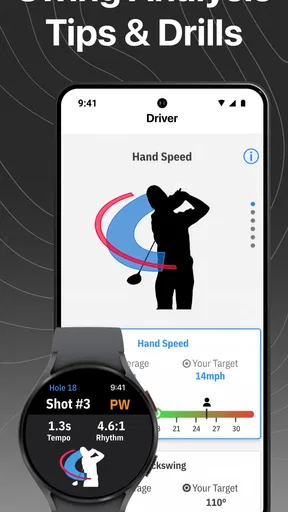
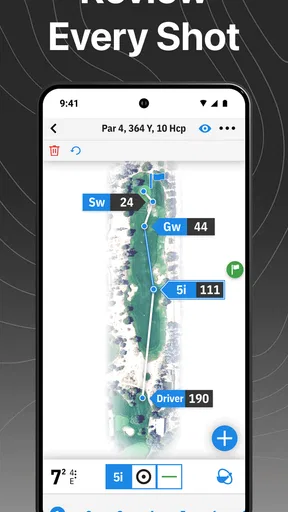
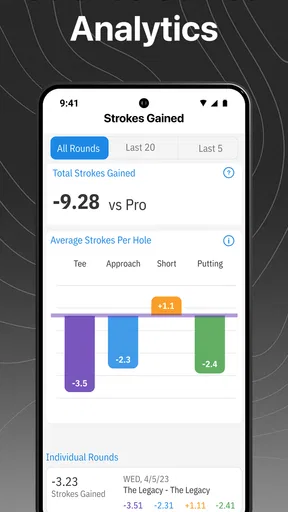
The app doesn’t just help you on the course; it’s also a fantastic tool for tracking your progress. With scorecards, stats, and shot tracking, you can analyze your game with the precision of a sports analyst. You can even dive into your past rounds to see how you’ve improved over time. The data is presented in such a user-friendly way, making it easy to spot trends and areas for improvement.
The useful long-term question is not whether I can collect more information, but whether I will record enough of it consistently to learn anything. If I only enter a score now and then, comparisons between rounds may tell me little. A simple approach is to pick one habit to keep steady—such as recording the score and using shot tracking when I have time—rather than trying to capture every detail from the start. Consistency makes the record more meaningful than an ambitious setup I abandon after a couple of rounds.
Statistics can also help me frame practice more clearly. If a round feels frustrating, reviewing the recorded information may help separate a poor overall impression from a recurring weakness worth working on. But I would avoid drawing firm conclusions from a small handful of rounds: course conditions and the kind of golf I played can change what the numbers mean. The app can organize observations; it cannot decide which change will actually help my swing.
Seamless Integration
If you’re like me and love your tech gadgets, you’ll appreciate how well Golfshot integrates with Apple Watch and Android Wear. This means you can keep your phone in your pocket and just glance at your wrist for all the vital info. It’s a great way to stay focused on your game without any distractions.
A watch can make the routine feel less intrusive, but it is not essential to the app’s main appeal. I would choose the setup that lets me check a distance without interrupting my pace or concentration. If I do not already use a compatible watch, I would not buy one solely to make a golf app more convenient; the phone-based experience may be perfectly adequate for occasional rounds.
Social Play and Shared Rounds
Golf is a social sport, and Golfshot understands that. You can connect with friends, share your rounds, and even organize games. It’s a fantastic way to keep that competitive spirit alive and maybe even engage in a little friendly trash talk!
These features will matter most to a group that already enjoys comparing scores or arranging games. For a golfer who prefers a quiet round, they are easy to treat as optional rather than a reason to use the app. I would also keep the social side secondary to the basics: if managing a group takes attention away from playing, a simple conversation before the round may be all the coordination needed.
Cost, Version, and Ongoing Value
The free version of the app is quite capable, while in-app purchases range from $1.99 to $59.99 per item. I would begin with the free experience and see whether I actually use the GPS, scoring, and tracking over several rounds before paying for anything. The current version is 2.11.5, and the app has been available since March 29, 2014; it is built for devices running Android 10 or later. Those details help set expectations when deciding whether an older phone is suitable and whether the app fits a current device.
Before spending, I would ask what I want beyond the basic routine. If my main need is an occasional yardage check, a paid option may not add enough value for me. If I regularly review rounds and want to make tracking part of how I practice, paid features may be easier to justify. The key trade-off is recurring attention as much as money: advanced tools are only useful if I keep using them.
How It Compares with Simpler Choices
The usual alternative is not always another feature-rich golf app. Some golfers prefer a dedicated GPS device, a watch, a course scorecard, or simply their own sense of distance. A dedicated device can be appealing if I want a purpose-built tool and do not want to manage a phone during play. A paper scorecard is less distracting and needs no app routine, but it does not give me the same convenient way to revisit tracked rounds and statistics.
This app makes the most sense for someone who wants several golf tasks together: yardages, scoring, and a record of play. That breadth is also a trade-off. A player who only wants a quick distance may find the extra tracking and account setup unnecessary, while a golfer who dislikes carrying or checking a phone may prefer a watch or standalone device. I would choose based on the behavior I will actually maintain, not the longest feature list.
When the Habit Sticks—and When It Doesn’t
Over the month-to-month stretch, Golfshot earns space on my phone if I return to it for a reason beyond curiosity. Checking yardages during rounds is the easiest habit to sustain; reviewing stats afterward takes a little more intention. One practical routine is to look back only after a round and choose one question to explore, rather than opening the app repeatedly between shots. That keeps the analysis from crowding out the social and physical parts of golf.
The main source of fatigue is over-instrumenting a game that many people play to relax. If I am constantly logging details, checking displays, or thinking about trends, the round can start to feel like a data-collection exercise. I would use shot tracking selectively on days when I am focused on improvement, and keep a casual outing lighter. That distinction makes the app more sustainable than expecting every round to serve the same purpose.
There is also a maintenance burden: I need a suitable phone, an account, and enough consistency to make stored round information useful. Keeping the app current and making sure the phone is ready for a day outside are ordinary parts of relying on a phone-based golf tool. If I often play without wanting to manage battery or device use, a dedicated alternative may suit me better. The right choice depends on whether convenience from having multiple tools together outweighs carrying another responsibility.
Who Should Keep It—and Who Should Skip It
I would recommend giving it a try to golfers who play regularly, enjoy a little feedback after a round, or want distances and scoring in one place. It can be particularly useful for someone returning to golf who wants a steadier way to record progress, as well as for friends who like to share rounds and keep friendly competition organized. A beginner may appreciate having reference distances, provided they remember that course management still involves more than selecting the number nearest to the ball.
I would skip it if I want golf to remain completely screen-free, if I rarely play and do not care to revisit scores, or if I already have a simpler device that answers my only question. It is also not a substitute for lessons, practice, or good judgment. The app can help me notice patterns, but it cannot tell me whether a swing change is sound or compensate for a poor decision made on the course.
The Verdict
In a nutshell, Golfshot Golf GPS RangeFinder is a game-changer for any golf enthusiast. Its range of features, from GPS tracking to game analysis, makes it an invaluable tool on and off the course. Whether you’re just starting out or a seasoned golfer, this app can help you take your game to the next level. So, grab your clubs, download the app, and hit the links with confidence—Golfshot’s got your back!
My more measured verdict is that it can become a lasting part of a golfer’s routine, but only if the practical tools keep earning attention after the first few rounds. I would start free, use yardages when they help, and add scoring or shot tracking at a pace I can maintain. If that routine makes decisions clearer or helps me reflect on my play, the app has a real purpose. If I find myself managing the phone more than enjoying the course, I would simplify or choose a less involved option.
Verdict
Strengths of Golfshot Golf GPS RangeFinder
- Accurate distance measurements to greens.
- Extensive course database with updates.
- User-friendly interface for easy navigation.
- Detailed statistics tracking for improvement.
- Seamless integration with Apple Watch.
Limitations of Golfshot Golf GPS RangeFinder
- Subscription required for full features.
- Battery drain on prolonged use.
- Occasional GPS signal issues.
- Limited offline functionality.
- Some features locked behind paywall.
Similar Picks in This Category
View All
BeSoccer: Soccer Live Score
BeSoccer apps4.3

Cricbuzz - Live Cricket Scores
Cricbuzz.com3.7

NFL
NFL Enterprises LLC2.4

Da Fit
MO YOUNG LIMITED3.6

ESPN
Disney4.5

LiveScore: Live Sports Scores
LiveScore Limited4.5
Frequently Asked Questions
What features does Golfshot Golf GPS RangeFinder offer?
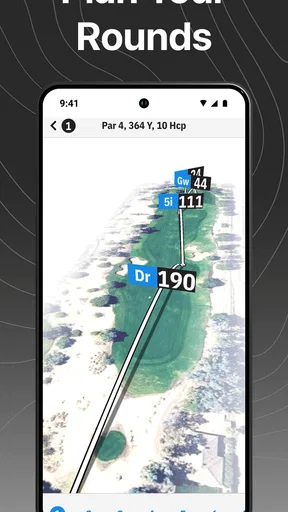
Golfshot Golf GPS RangeFinder provides a comprehensive suite of features for golfers, including GPS tracking for over 45,000 golf courses worldwide, detailed statistics for each round, club recommendations based on past performance, and 3D flyover previews of each hole. It also offers real-time distances to the green and hazards, making it a valuable tool for improving your game.
Is Golfshot Golf GPS RangeFinder compatible with both Android and iOS devices?
Yes, Golfshot Golf GPS RangeFinder is available for both Android and iOS devices. The app is designed to function seamlessly across different platforms, providing a consistent user experience whether you’re using a smartphone or a tablet. Make sure your device meets the app's system requirements for optimal performance.
Does Golfshot Golf GPS RangeFinder require an internet connection to work?
Golfshot Golf GPS RangeFinder primarily uses GPS technology to provide location-based services, which generally doesn’t require an internet connection once the course data is downloaded. However, some features, such as real-time score sharing and updates, may need an internet connection. It’s advisable to download course maps while on Wi-Fi to save data.
How accurate is the GPS feature in Golfshot Golf GPS RangeFinder?
The GPS feature in Golfshot Golf GPS RangeFinder is highly accurate, often providing distance measurements within a few yards of the actual location. The precision can vary slightly based on the quality of your device's GPS receiver and environmental factors, but generally, it offers reliable distances to greens, hazards, and other course features.
Is there a subscription fee for Golfshot Golf GPS RangeFinder?
Golfshot Golf GPS RangeFinder offers both a free version and a Pro version, which requires a subscription. The Pro version provides additional features such as advanced statistics, augmented reality views, and personalized club recommendations. Users can choose the subscription model that best suits their needs, with options for monthly or annual payments.
